Kamis, 30 Juli 2009

Testing BlackBerry Storm 9530


Touchscreen smartphones are certainly a big hit right now. If you consider Apple’s ever-popular iPhone, HTC’s well-received Touch lineup, and many others, touch is a high-demand feature. Manufacturers are certainly taking note of this fact. Traditionally speaking, the BlackBerry line of smartphones share a common layout with a QWERTY keyboard located beneath a standard (i.e. non-touchscreen) display.

Considering the popularity of touch, you can imagine that Research in Motion wasn’t going to hold out on creating a touchscreen device forever. As to be expected, the company received a lot of hype when it announced the first ever touchscreen BlackBerry smartphone in October of last year. But as the BlackBerry Storm 9530 officially hit the scenes late last year, it was met with mixed reviews.

We’ve been checking out Verizon Wireless’ version of this smartphone for over a month now. Instead of rehashing the same stuff that you’ve seen in other reviews, we’re going to look at this BlackBerry in terms of how it is different from other smartphones (not just other BlackBerries), and how well it will meet the needs of both business and personal users. In light of the fact that Amazon is now offering the Storm for just $99, it’s also important to consider what you’ll get for the money.
In years past, BlackBerries were most popular for business users who wanted easy access to email while on the go. As smartphones have evolved and become more widespread, however, we’re seeing more and more consumers carrying smartphones. Smartphones with touch screens have attracted the attention of many non-business users, perhaps because of the shiny interfaces they often provide.

The BlackBerry Storm’s clickable touchscreen is what sets the Storm apart from other touchscreen devices we’ve seen to date. We’ll discuss interactions with this screen more later, but it’s important to keep in mind that you must touch the screen to select a command and then press the screen to “click.” Other touchscreen devices simply require a single tap of a finger or stylus to initiate an action.

more info>>

Review Olympus Stylus Tough-8000


We do our best to protect our cameras, cell phones, MP3 players, and other electronics from extreme weather conditions, drops, force, and water. It makes sense to do so, given that most of these gadgets don’t stand a chance against a bucket of water, accidental drop, or extreme temperatures. Realizing that life brings its fair share of bumps, spills, and accidents, Olympus has launched an entire line of digital cameras that are designed to take a licking and keep on ticking.

The Olympus Stylus Tough-8000 is the top model in Olympus' newly renamed "Tough" series of digital cameras that are made to survive the battles of everyday life. This camera is able to survive a drop from 6.6 feet, capture photos at up to 33 feet underwater, withstand 220 pounds of crushing force, and it can be used in temperatures as low as 14 degrees Fahrenheit (-10 degrees Celsius). With these capabilities, it’s likely the photographer will surrender before this camera does.

Inside the Olympus Stylus Tough-8000's body, you’ll find a 12 megapixel image sensor and an Olympus-branded 3.6x optical zoom lens with a useful 28mm wide-angle view. The Stylus Tough-8000 is the first in the Tough lineup to include Dual Image Stabilization. Olympus’ Dual Image Stabilization system combines a mechanical Sensor-Shift Image Stabilization system with Digital Image Stabilization to help provide a powerful anti-blur solution and crisp, sharp photos. The Stylus Tough-8000 also features a unique tap control system and adds a new Beauty mode that will automatically touch up portraits.

Given the high ratings of TV shows such as Survivor as well as extreme sports in general, it makes sense that some consumers would demand a tough digital camera that can survive harsh treatment. As the most rugged model of the Tough lineup, the Stylus Tough-8000 promises to capture life’s memories even in the roughest of conditions. Read on as we take a closer look at how well the Stylus Tough-8000 captures life’s everyday moments and accidents.

Spesification Olympus Stylus Tough-8000


Shockproof

6.6ft / 2m

Waterproof

33ft / 10m

Freezeproof

14 degrees F / -10 degrees C

Crushproof

220lbf / 100kgf

Image Sensor

12 Megapixels (effective), 1/2.33" CCD

Focal Length/Lens Configuration

5.0 – 18.2mm (28 – 102mm equivalent in 35mm photography)

Zoom

3.6x Optical Zoom + 5x Digital Zoom

Maximum Aperture

F3.5 (W) / F5.1 (T)

Display

2.7" (6.9cm) HyperCrystal III LCD with Backlight Boost, approx. 230,000 dots, 5 Steps Brightness Adjustment

Focus System

CCD Contrast Detection

Focus Range (from lens surface)

Normal mode: 19.7" – infinity (0.5m – infinity)

Macro mode: Wide: 3.9" – infinity (0.1m – infinity) Tele: 11.8" – infinity (0.3m – infinity)

Super Macro mode: 0.8" – 19.7" (2cm – 50cm)

Focus Mode

iESP Auto, Spot AF, Face Detection AF

Shutter Speed

1/2000 sec. –1/4 sec. (up to 4 sec. in Night Scene mode)

ISO Sensitivity

Auto, High Auto, 64, 100, 200, 400, 800, 1600

Exposure Metering

Digital ESP Metering, Spot Metering, Face Detection AE (when Face Detection AF is selected)

White Balance Control

Auto, Daylight, Overcast, Tungsten, and three Fluorescents

Exposure Compensation

±2 EV steps in 1/3 EV steps

Image File Format

Still Image: JPEG

Movie: AVI Motion JPEG

Number of Recorded Pixels

12MP (3,968 x 2,976)

Motion Blur Suppression

Dual Image Stabilization

Shooting Modes

Intelligent Auto, Program Auto, Sensor-Shift Image Stabilization, Beauty Mode, 19 Scene Modes, Movie

Panorama

In-Camera Panorama, PC Panorama (Up to 10 frames automatically stitchable with OLYMPUS Master software)

Continuous Shooting

High speed: 5.0 frames per second, 11 frames (3MP)

Normal speed: 0.99 frames per second, 21 frames (12MP)

Movie Mode

AVI Movie with Sound: 640x480 (30/15fps) or 320x240 (30/15fps)

Image Processing

TruePic III Image Processor

Noise Reduction

Set automatically at shutter speeds of 0.5 second or longer in specific scene modes

Playback Edit Effects

Still Image: Red-Eye Fix, Shadow Adjustment Edit, Beauty Fix, Resize, Cropping, Black & White, Sepia, Calendar, Saturation

Movie: Frame Index

Self-Timer

12 Seconds

Memory

45 MB internal memory

Removable Media Card

xD-Picture Card (1GB, 2GB), microSD (adapter required)

Outer Connectors

Multi-Terminal (USB Connector, Audio/Video Output, DC Input via optional DC Coupler)

Auto-Connect USB

USB 2.0 High-Speed (USB Mass Storage)

Power Source

Li-ion Rechargeable Battery (LI-50B), AC Adapter (D-7AC) with the optional DC Coupler (CB-MA1)

Battery Life (CIPA DC-002)

250 Shots

Dimension

3.7"W x 2.4"H x 0.85"D (95mm x 61.7mm x 21.5mm)

Weight

6.4oz (182g) without batteries and memory card

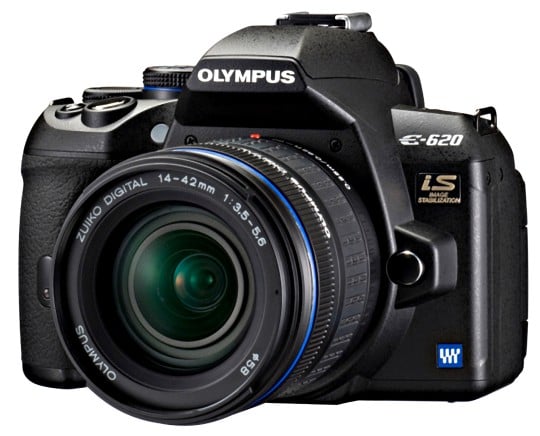
Olympus E-620 Digital SLR

Olympus’ latest E-620 DSLR targets users who are interested in something better than a budget entry-level DSLRs.This new camera is packed with features from the higher-end E-30, but uses a body that’s closer in size to the compact E-420 DSLR.The Olympus E-620 incorporates a Four Thirds lens mount and is compatible with a range of Four Thirds lenses from manufacturers such as Olympus, Sigma, and Panasonic / Leica.Keep in mind that since the E-620 uses the Four Thirds system, there’s a 2x digital crop factor. This means the equivalent 35mm spec is doubled. Put into numbers, this means the supplied 14-42mm kit lens is actually a 28-84mm lens, and so on.


At the time of this writing, the E-620 is the smallest body to offer built-in Image Stabilization. What’s great about in-body stabilization is that it works with any lens you attach—new, old, prime, or zoom—so you won’t be paying for this feature with future lens purchases as you would with manufacturers such as Canon or Nikon who build the feature into each lens. The downside with in-body stabilization is that you won’t get to see the stabilizing effect through the viewfinder.

New Nikon Coolpix L100


Don’t be fooled by the Nikon Coolpix L100’s DSLR-like looks. Although the L100 looks like a high-end camera that could compete with the functions of a DSLR, it’s really a relatively simple point-and-shoot with a wide angle 15x zoom lens as well as image stabilization, a 3-inch LCD, and a high speed burst shooting mode of 13fps that surpasses that of many cameras.
The L100 is part of Nikon’s Life series of digital cameras that are known for their simple and easy to use functions. As Nikon describes it, the Life series is “Powerfully capable–yet simple, at an entry-level price.” Indeed, the L100 offers plenty of fully automatic controls for the user who wants to simply point and shoot.


In fact, unlike a lot of mega zoom cameras on the market today, the L100 was designed for fully automatic use and doesn’t offer many manual controls at all.
With an MSRP of about $280, the L100 has a lower price tag than most mega zoom cameras currently available. Beyond the wide angle zoom lens with an equivalent focal length range of 28-420mm, the L100 doesn’t have the same number of bells and whistles as you’ll see on the L100’s higher-priced mega zoom competitors. However, the L100 isn’t completely bare-bones. It still features a 10 megapixel sensor, Nikon’s latest EXPEED image processor, 4-Way VR Image Stabilization, and Nikon's Smart Portrait System which includes red-eye fix, face detection, smile

Read More>>

iPhone Palm


The Palm Pre is likely one of the most anticipated smartphones to arrive this year. First announced at CES 2009, the Palm Pre has been called an iPhone killer, Palm’s comeback device, and Sprint’s savior. Needless to say, there are a lot of expectations for the Pre.

Two of the first things you’re likely to notice about the Pre are its sleek, clean design and its vibrant display. The Palm Pre also boasts of the ability to multitask, it has a new notification system, a physical keyboard, and a screen with multi-touch capabilities. All of these features combine to make a phone that appears to be one of the best iPhone rivals yet.


On the inside, the Pre runs Palm’s latest operating system, called webOS. This new OS has also received a lot of hype. Although it’s almost hard to believe, there’s been talk about a Linux-based Palm smartphone since 2004. Obviously, the Palm Pre and webOS have been a long time coming.

As a company, Palm has certainly experienced highs and lows. At the peak, Palm was synonymous with smart handheld devices. Prior to the Pre’s launch though, the company had lost much of its market share. Some users had even given up on Palm and discounted the company as a worthy competitor in the smartphone market. Given this bumpy ride, you can see just how much Palm has riding on this new smartphone and OS.

So how does the Pre compare to other smartphones on the market? And will the Pre and webOS be enough to save Palm? What about Sprint—will the Pre help this struggling carrier better compete against the likes of Verizon Wireless and AT&T? These are a few of the questions we’ll attempt to answer in our hands-on review in the following pages.

Jumat, 17 Juli 2009

Spesification TRENDnet TEW-631BRP Router and TEW-621PC PC Card


Standards Wired:
IEEE 802.3 (10Base-T)
IEEE 802.3u (100Base-TX)
Wireless:
IEEE 802.11b
IEEE 802.11g
IEEE 802.11n (draft)
WAN:
1 x 10/100Mbps Auto-MDIX Port (Internet)
LAN:
4 x 10/100Mbps Auto-MDIX Port
Slide Switch:
Turn On/Off Wireless LAN
Config Button:
Reserved for WPS function use
Connection Type:
Dynamic IP, Static (Fixed) IP, PPPoE, PPTP, L2TP
NAT Firewall:
4K ~ 16K Configurable NAT entries; Restricted NAPT
IP Ranges, Port Ranges & Schedule
Pre-Defined Game Hosting Configurations
Port Triggering for 64 Special Applications
ALG Support – RTP/RTSP, AOL, FTP, ICMP, WMP/MMS, NetMeeting, SIP
ALG Enable/Disable
SPI Firewall:
Up to 64 Rules
Cyber Attack Protection – Verified Against Over 2000 Attacks
Multicast Stream:
Enable/Disable control support
UPnP:
UPnP IGD Compliant
DMZ:
DMZ Host, 64 Configurable Virtual Servers & Game Servers
DNS:
Static or WAN assigned DNS Servers8 Verified Services for DDNS
Internet Access Control:
Policy Based Parental Controls
Time Based Internet Access
Port Range/Service Filtering
URL Filtering
Inbound Filter
20 User Defined Schedules
20 MAC Address Filter Entries
LED Indicator Power:
LAN1~LAN4, WAN, WLAN
Power Adapter:
12V DC, 1A External Power Adapter
Power Consumption:
6W @ 12VDC
Dimension:
(L x W x H)
180 x 122 x 30 mm
6.8 x 4.6 x 1.1 inches
Weight:
350g (0.8 lb)
Temperature Operation:
0°~ 40°C (32°F~ 104°F)
Storage:
-20°~ 60°C (-4°F~140 °F)
Humidity:
Max. 90% (Non-Condensing)
Certifications:
CE, FCC
Wireless:
Frequency 2.412 ~ 2.462 GHz (FCC)
2.412 ~ 2.472 GHz (ETSI)
Antenna:
3 x 4dBi Fixed Dipole Antenna
Data Rate:
802.11b: 11Mbps, 5.5Mbps, 2Mbps, and 1Mbps
802.11g: 54Mbps, 48Mbps, 36Mbps, 24Mbps, 18Mbps, 12Mbps, 9Mbps and 6Mbps
802.11n (draft): up to 300Mbps

Media Access Protocol:
CSMA/CA with ACK
Security Encryption:
Hardware AES/TKIP, 64/128-bit WEP (Hex/Passphrase)
WPA: WPA/WPA2(EAP/802.1x), WPA-PSK/WPA2-PSK
SSID Broadcast Control
Output Power:
802.11b: 18dBm (typical)
802.11g: 15dBm (typical)
802.11n (draft): 14dBm (typical) with HT20 & HT40
Receiving Sensitivity:
802.11b: -84dBm (typical) @ 11mpbs
802.11g: -72dBm (typical) @ 54Mbps
802.11n (draft) : -70dBm (typical) with HT40
Channels:
1~ 11 (US), 1~13 (EU)

TEW-621PC Wireless CardBus
Interface:
32-Bit
3.3V
CardBus Type II Card
Standards:
IEEE 802.11b
IEEE 802.11g
IEEE 802.11n (draft)
LED:
Indicator Power, Link
Power Consumption:
Receive Mode: 600mA(max)
Transmit Mode: 690mA(max)
Supported OS
Windows 2000/XP
Dimensions:
(LxWxH)
114 x 54 x 3mm
4.3 x 2.1 x 0.13 inches
Weight:
40g (1.3oz)
Temperature Operating:
0° ~ 40° C
32° ~ 104° F
Storage:
-25° ~ 70° C
-13° ~ 158° F
Humidity:
10% ~ 90%max (Non-condensing)
Emissions:
FCC, CE
Wireless Module Technique:
802.11b: CCK (11 and 5.5Mbps), DQPSK (2Mbps), DBPSK (1Mbps)
802.11g: OFDM with BPSK, QPSK and 16/64-QAM sub-Carrier modulations
Antenna:
Built-in 3 PCB Antennas
Frequency:
2.412 ~ 2.484 GHz
Media Access Protocol:
CSMA/CA
Data Rate (auto fallback)
802.11b: 11Mbps, 5.5Mbps, 2Mbps, and 1Mbps
802.11g: 54Mbps, 48Mbps, 36Mbps, 24Mbps, 18Mbps, 12Mbps, 9Mbps and 6Mbps
802.11n (draft) : up to 300Mbps*
Output Power:
802.11b: 18dBm (typical)
802.11g: 15dBm (typical)
802.11n (draft) : 14dBm (typical) with HT20 & HT40
Receiving Sensitivity:
802.11b: -84dBm (typical) @ 11mpbs
802.11g: -72dBm (typical) @ 54Mbps
802.11n (draft) : -70dBm (typical) with HT40
Encryption:
64/128-bit WEP (Hex & ASCII), WPA/WPA2, WPA-PSK/WPA2-PSK
Channels:
1~11 (US), 1~13 (EU)


TRENDnet TEW-631BRP Router and TEW-621PC PC Card


At this point in time, it's probably safe to assume that the majority wirelles network users are outfitted with some type of 54Mbps solution. First introduced in 2003, 802.11g has proven its worth as a solid wireless technology for both home and business users alike. However, as technology advances and the demands for more bandwidth and improved range increase, a new solution is needed as 802.11g has essentially reached its peak in terms of features and capabilities.

To help address the need for better security, longer range and more bandwidth, the powers that be have come up with 802.11n (draft) technology. "Draft" indicates the technology is proven but has not completed the standardization process, which is slated to occur within the next year or so. Nonetheless, the design is in place and the proposed standards are clear, allowing manufacturers to start designing and marketing products that offer many of the benefits of the future 802.11n standard.

So what makes 802.11n (draft) so much better than the popular 802.11g and older 802.11b technology? In a nutshell, 802.11n brings significantly higher bandwidth (300Mbps peak vs 802.11g's 54Mbps and 802.11b's 11Mbps). Additonally, the potential range of 802.11n (draft) is nearly double that of 802.11g, helping to increase coverage and maintain a stronger signal through solid objects.


Today, we are going to take a look at two 802.11n (draft) hardware components. The main focus of our review will be on the TRENDnet TEW-631BRP Firewall Router which brings future 802.11n features to the table as well as backwards compatibility with 802.11b and g. Second, we have the TEW-621PC Wireless CardBus which is a PCMCIA add-on that helps laptops enjoy full 300Mbps capabilities when used in conjunction with a router like the TEW-631BRP. By combining the two in our test environment, we'll be able to demonstrate the advantages of 300Mbps over 54Mbps WiFi as well as spotlight the features each product brings to the table.


thanx to tomhadware.com

More Info>>


Specifications Thecus N5200BR NAS Server


HDDs
5 x 3.5" SATA II HDD, Hot-swappable

eSATA port
1 x eSATA connector for capacity expansion

USB ports
2 x USB A type (Host mode)
1 x USB B type (Client mode)

Ethernet ports
N5200 RouStorTM :
1 x Gigabit RJ-45 Connector
4 port Gigabit switch

LCD Control Panel
For basic configurations and status display

Network File Protocols
Microsoft Networks (CIFS/SMB)
Apple Filing Protocol (AFP 3)
Network File System (NFS v3)
File Transfer Protocol (FTP)
Hyper Text Transfer Protocol (HTTP)
Secure Hyper Text Transfer Protocol (HTTPs)

Authentication
Microsoft NT Domain Controller (PDC)*
Microsoft Active Directory Authentication (AD)*

Network Client Type
Microsoft Windows NT/2000/XP/2003
Unix/Linux/BSD
MAC OS X, OS 9, OS 8.6

Network Configuration
Fixed IP Address
Dynamic IP Address

Disk Management
Power Management (Disk idle spin-down)
Disk Status Monitoring (S.M.A.R.T.)

RAID
RAID 0, 1, 5, 6, 10, and JBOD
Auto Rebuild
Hot Swappable
Hot Spare
Disk Roaming
RAID Level Migration
RAID Expansion
Disk Capacity Supported :
80/120/160/200/250/300/400/500/750/1000 GB
Folder Management
Share Folder Level Permission
File Level Permission
Public Folder
Quota Management
Share Folder Quota Control

Backup
Thecus Backup Utility (Microsoft Windows XP/2000 /MAC OS X)
Thecus Nsync

System Management
Web GUI
Multilingual Support (English, French, German, Italian, Traditional Chinese, Simplified Chinese, Japanese, Korean, Spanish)
Event Notification
Email Notification
Buzzer Notification
LCD

Supported USB Devices
USB Printer
External HDD/Flash disk
USB IEEE 802.11 b/g dongle w/ AP mode support **

Setup Utility
Windows 2000 / XP / 2003
MAC OS X

Safety and Environment
CE, FCC, BSMI, C-Tick, RoHS Compliant

Dimension
230 x 190 x 230 mm (H x W x D)

Physical
Lockable Disk Tray

Operating Environment
0 - 40 C
20 – 85
Relative Humidity (non-condensing)

Power Supply
Server-rated AC Power Supply
100/220VAC, 50/60 Hz, Auto detect

*PDC/AD support: Works as a client member in an Microsoft NT 4.0 domain/Active Directory domain, allowing the N5200 to utilize the domain users and groups setting for authentication to the system and authorization to the share folders.

Thecus N5200BR NAS Server

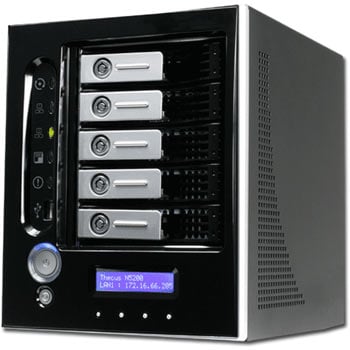
As digital media increases in popularity, so will the demand for larger storage options, whether in the form of increased hard drives capacities or through the use of expandable network storage devices. The last time we broached the topic of NAS was with our article on two impressive SOHO units from QNAP. While not industrial strength solutions, both QNAP models offered a balance of hardware and software features that made them excellent solutions for both home and small business users. However, with the TS-101 being a single drive solution and the TS-201 being a two-drive option, they are limited when it comes to ease of expansion and growth in a user's storage needs. This is where the Thecus N5200BR NAS Server steps in.
The Thecus N5200BR NAS Server targets end-users with more demanding network storage needs. To offer a more universal solution, Thecus designed the N5200BR with five SATA II bays supporting numerous RAID options, an LED status read-out, router capabilities and a host of other features to make it a serious contender for home users and in the commercial environment where a highly configurable NAS unit is a must. On the surface, the Thecus N5200BR looks to have what it takes to fit a wide variety of NAS needs. In the pages ahead, we'll look below the surface to ascertain the strengths and weaknesses of the Thecus N5200BR NAS Server, with a goal of providing a complete and clear picture of what a unit like this can deliver.

More Info >>

Specifications HP MediaSmart Server LX195


Storage Capacity:
Total storage capacity
expandable up to:
Operating system:
Processor:
Memory:
Drive bays:
Hard drive:
Connectivity:

Compatibility:
Dimension:
Package contents:


640GB


5TB
Windows Home Server
1.6GHz Intel Atom 230
1 GB RAM
1 bay
640GB 7200rpm SATA
10/100/1000 RJ-45 Gigabit Ethernet port; (4) USB 2.0 ports
Windows XP, Windows Vista, Mac OS X 10.5
8.2x3.9x8.0-inches (HWD)
HP MediaSmart Server, power adapter and cable, Ethernet cable, software installation disc, PC restore disc, server recovery disc, setup poster and HP support guides

MSRP: $399.99

HP MediaSmart Server LX195 Review

Windows Home Server is quite possibly one of Microsoft's most unheralded operating systems. Many speak longingly of Windows XP, jokingly of Windows ME, disappointedly of Windows Vista, and hopefully of Windows 7. But seldom discussed is the little-known and little-used operating system designed to be installed on a home server and act as a central depository for serving media and other files, as well as a place to backup your home systems' files. For those who have used it, many praise Windows Home Server's functionality and performance--especially since Microsoft has made some significant updates to the OS recently. (Windows Home Server is actually based on Microsoft's Windows Server 2003.)

It is possible to purchase the Windows Home Server OS and install it yourself on your own rig: you can download or order a free 120-day trial of the OS from Microsoft here. Many users, however, choose to buy home servers with the Windows Home Server OS already installed. Hewlett-Packard (HP) was the first such vendor to provide a system with Windows Home Server pre-installed, with its MediaSmart Server series. HP was soon joined by a short list of other system vendors, including Niveus and Velocity Micro. A number of the existing Windows Home Server offerings are moderately priced, with several selling for well below $1,000. However, before HP's just-launched, $399.99 (MSRP) HP MediaSmart Server LX195, none of them filtered down to a mainstream budget price point.
HP presently offers three different HP MediaSmart Server options (its older models have been phased out). The two top models, the HP MediaSmart Server EX485 ($599.99 MSRP) and EX487 ($749.99 MSRP) both come with a total of four user-serviceable drive bays--these two models are identical to each other, with the exception that the EX485 comes with a single 750GB hard drive and the EX487 comes with two 750GB drives (for 1.5TB total storage). The LX195 uses a less-powerful processor, less RAM, only one (non-user-serviceable) drive bay with a 640GB hard drive, and a smaller form-factor than the EX series (the EX series also includes an eSATA port, which the LX195 lacks). The installed version of the software is also a bit different between the EX series and LX195--with the EX series having a bit more functionality than the LX195 (more on this a later).

The LX195 is fairly easy to setup and use, but the potential gotchas and myriad of configuration options are numerous. The included two-page MediaSmart Server Setup Poster provides minimal directions, with most of the setup conducted by the software installation wizard. While a 230-page, HP MediaSmart Server User's Guide exists, oddly it is not included on the installation CD; but you can download it from HP's site
More Info>>

Fave This

Your Ad Here